Swing High Low – Definition and Sequence Guide | SG Group
Skip to content
Japanese page

FreeOpen sourcePine Script v6

TradingView Free Indicator

Follow the same accepted swing origin through three confirmation spans. Compare wick, body-edge and close definitions, then inspect the ordered sequence of outside excursions, consecutive outside closes and later inside returns.

Swing Extremes / Definition and Timing
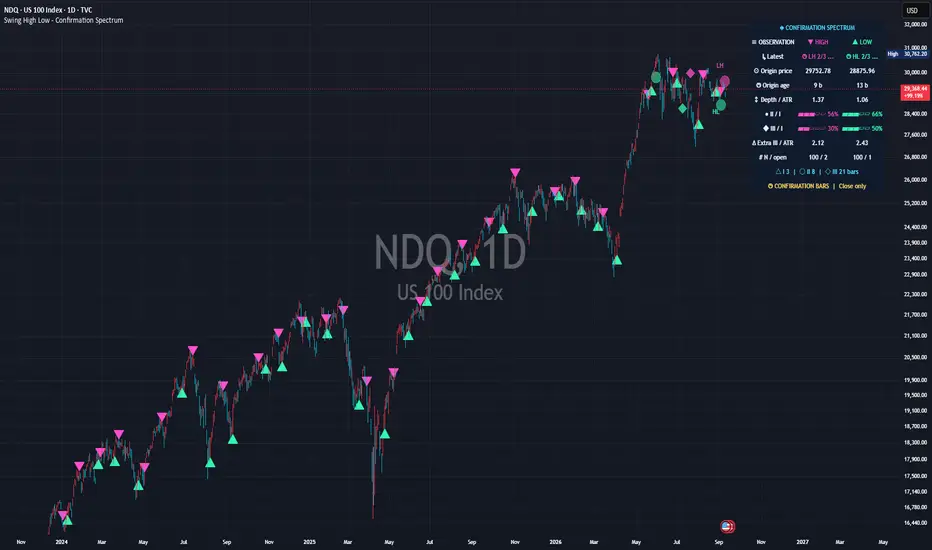
Real chart published on TradingView: Swing High Low - Definition and Sequence
Real chart image from the published TradingView page. The symbol, timeframe, settings and prices shown are a captured example, not current data or a trading result.
PurposeSeparate swing definition, information timing and subsequent path observations
Best forUsers examining wave tops/bottoms with explicit confirmation delays and price definitions
Primary outputStage markers, HH/HL classifications, retention panel and definition/path records
Chart placementPrice-chart overlay
01 — Overview

Separate the extreme candle from the candle that made it known

Later tests keep the original candle rather than searching for a nearby replacement. Highs and lows are processed independently without forced alternation or an inferred order when both qualify on one candle. Initial definition groups are fixed using Stage-I information.

What it visualizes

Magenta downward triangles for high Stage I, mint upward triangles for low Stage I, circles for Stage II and diamonds for Stage III. The panel prints latest-origin information, shoulder depth, retention rates, extra waiting drift, sample size and pending count. Tooltips and Data Window outputs carry the detailed research.

How it works

The fixed six-bar left context is tested against right spans of 3, 8 and 21 bars by default. Stage II adds five bars to Stage I; Stage III adds thirteen more. Later failure does not remove the initial event retrospectively. Price definition, tie rule, shoulder depth and same-side spacing are distinct controls.

Fixed-candle definition tests

Each stage tests Wicks, Bodies and Close against Rightmost, Leftmost and Strict, up to 27 related conditions. Strict implies both other tie rules. The study does not rerun full alternative detector histories with new depth/spacing admission.

Shoulder depth versus signed isolation

Printed depth is the smaller two-sided retreat. Isolation compares origin price with the strongest competitor over the fixed left and scheduled right windows, divided by origin ATR. Positive is isolated, zero tied, negative exceeded.

Shared retention denominator

II/I and III/I use the same usable initial origins that completed the Stage-III horizon. Pending records are absent. Extra III/ATR is additional Stage-I-to-III close drift among Stage-III-retained origins; high-down and low-up are positive, and negative results are possible.

Equal-length post-confirmation study

Each attained stage starts an H-bar window after its confirmation close. All results mature together at origin + Stage-III span + H. Matched comparisons condition on Stage-III retention and do not establish a causal benefit from waiting.

02 — Install and start

Add it to TradingView

Start with standard candles and Confirmation bars placement. A triangle identifies the confirmation of an earlier origin. Set Inspect record in group 07 to 1 to examine the newest completed admitted record.

Swing High Low – Definition and Sequence

Open the public Swing High Low – Definition and Sequence page and add it to TradingView. No SG Group account is required.

  1. Open the “Use on TradingView” link below.
  2. Select “Use on chart” on TradingView to add the script to your chart.
  3. Open the gear icon, then Settings → Inputs, and observe the default configuration first.
  4. Change one input at a time for the symbol and timeframe you are studying.
Observe the defaults firstChange one input at a timeVerify symbol, timeframe and feed

Prevent misreads when indicators overlap

Overlapping lines, bands, backgrounds or tables can be duplicate drawings of the same kind of information. Never treat visual overlap by itself as stronger evidence or signal agreement. Other swing markers, Zig Zag, support/resistance tools and Fibonacci anchors can place nearby marks with different availability times. Triangles, circles and diamonds are successive observations of the same origin.

  • Hide other pivot/Zig Zag drawings and compare origin and confirmation timestamps.
  • Begin with confirmation placement; do not interpret a backdated trace as an early signal.
  • Do not sum three stages or 27 related checks as independent confirmations.
  • Separate panels, detector spacing, presentation spacing, sample counts and visible marker counts.
03 — How to read it

A practical reading order

Read placement, stage and origin timestamp first, then distinguish printed latest values from the inspected record’s tooltips. The table shows the loaded execution’s latest closed-bar state, not the bar beneath the cursor.

Separate three deadlines

With origin at 0, confirmations are +3/+8/+21. Retention matures at +21; ordered paths use bars 4–27 and mature at +27; equal-length windows use 4–15, 9–20 and 22–33 when attained, with common maturity +33.

Select the record

Inspect 0 follows the latest origin; 1 selects the latest completed admitted record. Hover Origin price for definitions, Origin age for ordered path, Depth/ATR for margins and initial groups, and N/open for admission/exclusions. Printed latest values do not change.

Interpret definition agreement

W[RLS] B[—] C[—] means the wick passes every tie rule while body and close do not. The 0–3 count measures source definitions passing the selected tie rule. Initial all-three versus definition-sensitive membership is never revised by later results.

Read the ordered path

Defaults inspect 24 post-I bars, an outside wick, a 1-ATR inward excursion, two consecutive outside closes and a later single inside close. A high at 100 with ATR 2 has an outside boundary of 100.10 and return below 99.90. Both crossings must be strict.

Respect unknown intrabar order

First outside wick and inward excursion on the same candle produce SAME BAR: order unknown. The whole first outside candle is excluded from pre-outside inward movement. Excursion extrema do not imply executable fills.

Keep path and detector sources separate

Outside wick excursions use chart highs/lows even when the detector uses Bodies or Close. The Stage-I confirmation candle is excluded from the ordered path; its own outside wick is reported separately. First means first inside this post-confirmation window, not necessarily first since the origin.

Status and display terms

I / II / III

Triangle/circle/diamond; default confirmations of one origin at +3/+8/+21.

HH / LH / EH; HL / LL / EL

Higher/lower/equal accepted high; higher/lower/equal accepted low. Initial same-side records use H/L.

W / B / C; R / L / S

Wick/body/close with rightmost/leftmost/strict tests. ? means unavailable; stages not yet due remain pending.

Path 0 / 1

0: no outside wick in-window. 1: outside wick without the required outside-close run; isolated outside closes may still exist.

Path 2 / 3 / -1

2: accepted outside without the required later return. 3: acceptance followed by return, not necessarily an inside final candle. −1: unusable.

SAME BAR

First outward wick and inward milestone share a bar; intrabar order is unknown.

II / I; III / I; N / open

Retention frequencies over one completed cohort / retention sample and pending count, separate from detailed-study populations.

Latest; clock / ellipsis / square

Latest accepted origin and attained stage. Clock/ellipsis means pending; square means horizon ended, not all stages passed.

04 — Settings reference

Settings reference

The labels below match the published script’s English Inputs panel. Defaults reflect the public source at the time of review and may change in a later TradingView update.

On small screens, each input is reformatted as a readable stacked card.

01 – Swing detection

7 inputs
Input labelDefault / optionsWhat it controls and when to adjust it
Left context bars6 / min 1, max 200Left-side context, default six bars, stays fixed across all stages. The stages are not three symmetric pivot detectors.
Stage I: right bars3 / min 1, max 100Initial right-side confirmation delay, default three bars. The event is known only after the final required bar closes.
Stage II: additional right bars5 / min 1, max 200Additional bars beyond Stage I; default five makes Stage II eight bars from the origin.
Stage III: additional right bars13 / min 1, max 300Additional bars beyond Stage II; default thirteen makes Stage III twenty-one bars from the origin.
Price definitionWicks / options: Wicks, Bodies, CloseWicks uses highs/lows, Bodies the upper/lower body edge, and Close the close for both sides. ATR always uses chart OHLC.
Equal-extreme selectionRightmost / options: Rightmost, Leftmost, StrictRightmost permits older ties only; Leftmost permits newer ties only; Strict rejects ties on both sides within the tested windows.
Minimum same-side spacing (bars)3 / min 0, max 200Minimum separation between accepted same-side origins. Zero disables it; high and low detection stays independent.

02 – Shape and comparisons

3 inputs
Input labelDefault / optionsWhat it controls and when to adjust it
ATR normalization length14 / min 1, max 200ATR period, default fourteen. Research distances use ATR frozen at the origin.
Minimum two-sided shoulder depth (ATR)0.2 / min 0, max 10Uses the smaller retreat across the left and initial-right shoulders, excluding the origin, divided by origin ATR. Zero disables the filter.
HH / LH / HL / LL equality tolerance (ticks)1 / min 0, max 100Tick tolerance for classifying equality against the preceding accepted same-side origin. It does not change detector tie rules.

03 – Chart annotations

18 inputs
Input labelDefault / optionsWhat it controls and when to adjust it
Stage-I marker placementConfirmation bars / options: Confirmation bars, Origin bars (backdated)Confirmation bars marks when the earlier origin became known. Backdated mode places Stage I at the origin only after confirmation, with a delay trace. Later stages and alerts keep their actual times.
HighsOnShows high-side annotations.
LowsOnShows low-side annotations.
Stage II dotsOnShows Stage-II circles.
Stage III diamondsOnShows Stage-III diamonds.
Chart densityAdaptive / options: Adaptive, Fixed spacing, All within limitsAdaptive thins symbols by visible closed bars; Fixed spacing uses the visual gap; All within limits removes spacing filters. Budgets remain, and detection/statistics/alerts are unchanged.
Adaptive horizontal slots per side45 / min 10, max 150Approximate horizontal slots per side for adaptive density. Fewer slots create wider separation; this is not pixel-level collision detection.
Minimum visual spacing (bars)3 / min 0, max 100Visual bar gap applied separately to highs and lows, newest first. It is distinct from detection spacing.
Stage-I markers per side30 / min 3, max 120Stage-I marker budget per side, default thirty.
Stage-II / III markers per side6 / min 0, max 40Separate later-stage symbol budget, default six per side. Zero hides symbols only.
Stage-II / III recent window (bars; 0 = all visible)100 / min 0, max 20000Age window for later-stage symbols relative to the last visible closed bar. Zero means the full visible span, subject to budgets and cache limits.
Overall visual age limit (bars; 0 = all visible)0 / min 0, max 20000Overall symbol age measured from confirmation to the visible right edge. Panning rebuilds presentation, not research membership.
Recent Stage-I captions per side1 / min 0, max 6Recent Stage-I text captions per side, default one. Zero keeps symbols without captions.
Caption contentClass / options: Class, Class + stage, Class + origin priceCaption may show class alone, class plus stage, or class plus origin price.
Minimum candle clearance (ATR)0.35 / min 0.05, max 3Minimum marker-to-candle clearance in ATR units, default 0.35.
Clearance floor (% of visible price range)1 / min 0, max 3Clearance floor as a share of visible price range; the larger of this and ATR clearance is used. It does not measure exact pane pixels.
Fine Stage-I precision pinsOnFine connectors for Stage I only, pointing to origin price in backdated mode or to the confirmation candle otherwise.
Pin / delay-trace width1 / min 1, max 3Width of pins and delayed-origin traces.

04 – Colors and typography

11 inputs
Input labelDefault / optionsWhat it controls and when to adjust it
High#FF4FCBHigh-side color, magenta by default.
Low#35F5ACLow-side color, mint by default.
Readout accent#54DFFFReadout accent color.
Timing notice#FFD45CColor for timing notices.
Readout background#101A2CReadout background color.
Readout text#EEF4FFReadout text color.
Stage-I symbol sizeTiny / options: Tiny, Small, NormalStage-I symbol size: Tiny, Small or Normal.
Stage-II / III symbol sizeTiny / options: Tiny, SmallLater-stage symbol size: Tiny or Small.
Caption font size11 / min 8, max 20Caption font size, default eleven.
Stage-II / III transparency45 / min 0, max 85Later-stage transparency; higher values appear fainter.
Bold textOnEnables bold text.

05 – Research readout

7 inputs
Input labelDefault / optionsWhat it controls and when to adjust it
Show compact readoutOnShows the compact readout.
PositionTop right / options: Top right, Bottom right, Top left, Bottom leftPositions the panel in one of four corners. Avoid overlapping another table.
Readout font size11 / min 8, max 20Readout font size, default eleven.
Outer horizontal inset (%)1.2 / min 0, max 8Transparent outer gutter as a percentage of available indicator width, useful near native price labels.
Completed observations per side100 / min 10, max 1000Rolling retention capacity, default one hundred per side. Both rates share the same usable Stage-III-matured initial-origin denominator.
Retention mini-barsOnShows miniature retention bars.
Readout iconsOnAdds icons within existing cells. A filled square means horizon completion, not successful extreme retention.

06 – Post-confirmation research

4 inputs
Input labelDefault / optionsWhat it controls and when to adjust it
Enable post-confirmation researchOnEnables the equal-length post-confirmation study without filtering the primary detector or replacing printed readout values.
Bars AFTER each confirmation12 / min 1, max 150Number of closed bars after each attained confirmation, excluding that candle. All stage results mature together at origin + Stage-III span + H.
Audit sample admissionAll accepted origins / options: All accepted origins, Non-overlapping per sideAdmits all accepted origins or non-overlapping same-side origins. Admission is fixed at Stage I, after the previous admitted record’s deadline; outcomes do not trigger replacement.
Additional Data Window outputsOnExposes extended historical means, retention and matched results at common maturity. Hiding outputs does not disable calculations or the original six stage-price series.

07 – Definition and ordered-path study

12 inputs
Input labelDefault / optionsWhat it controls and when to adjust it
Enable definition and path studyOnEnables fixed-origin definition tests and ordered post-I paths in tooltips without changing primary markers or printed cells.
Ordered path: bars AFTER Stage I24 / min 1, max 150Ordered-path horizon after Stage I, excluding its candle. Maturity is origin + max(Stage-III span, Stage-I span + horizon).
Outside-level buffer (origin ATR)0.05 / min 0, max 5Outward buffer in origin ATR. The effective fixed buffer is the larger of ATR and tick components; crossings must be strict.
Minimum outside buffer (ticks)1 / min 0, max 100Minimum outward buffer in ticks, default one.
Consecutive outside closes for acceptance2 / min 1, max 10Consecutive strictly outside closes required for the acceptance milestone. A nonqualifying close resets an unfinished run.
Inside-return clearance (origin ATR)0.05 / min 0, max 5Inside clearance after acceptance, default 0.05 origin ATR. Return requires later closes strictly inside; the acceptance candle’s wick cannot imply it.
Consecutive inside closes for return1 / min 1, max 10Required consecutive inside-return closes, default one.
Inward excursion milestone (origin ATR)1 / min 0.05, max 10Inward excursion from the Stage-I confirmation close, measured with wicks. If first inward and outward events share a candle, intrabar order is unknown.
Definition/path sample admissionAll accepted origins / options: All accepted origins, Non-overlapping per sideSeparate admission policy for definition/path research, fixed at Stage I. Skipped origins are not substituted retrospectively after later outcomes.
Completed definition/path records per side100 / min 10, max 500Capacity for completed admitted definition/path records. Unusable paths may remain as records but are excluded from path-group statistics.
Inspect record (0 = latest origin, 1 = latest completed)0 / min 0, max 500Zero follows the latest accepted origin; one and above select progressively older completed admitted records. Only added tooltips change. Unavailable offsets do not substitute another record.
Definition/path Data Window recordsOnSix outputs identify origin time, initial agreement and path code per side on the common maturity candle. Code −1 means unusable, not success or failure.
05 — Alerts

Eleven bar-close alert conditions

Select a TradingView condition for stage or research completion. Completion can include an unusable record and does not mean success. Ordered-path completion is not a realtime breach/return alert.

  • High – Stage III.
  • Low – Stage III.
  • Any stage confirmed.
  • Observation horizon completed.
  • High – Post-confirmation horizon completed.
  • Low – Post-confirmation horizon completed.
  • High – Stage I.
  • Definition / ordered-path study completed.
  • Low – Stage I.
  • High – Stage II.
  • Low – Stage II.
06 — Limitations and responsible use

Not a buy/sell signal

This tool is for analysis and visualization. It is not investment advice, a trade recommendation, a forecast, or a promise of profit or accuracy. Results depend on inputs, symbol, timeframe, and data feed. You remain responsible for every trading decision.

Backdating is delayed annotation

Origin bars places Stage I at the earlier candle only after confirmation. Later stages, event outputs and alerts retain their actual availability times. Do not treat the origin marker as information available at the origin.

Symbols are not an exhaustive ledger

Density, budgets, age and finite caches can change visible symbols and clearance on pan/zoom. A classification may compare with an accepted origin currently hidden. Presentation does not change research samples or alerts.

Distinguish missing, pending and failed

Path −1 is unusable. A completed record may retain valid definition tests while being excluded from path-group statistics. Missing ATR or malformed OHLC must not be interpreted as a successful hold.

Admission and dependence

Non-overlap is fixed at Stage I after the preceding admitted same-side deadline, without outcome-based replacement. Opposite sides can overlap; non-overlap is not independence. Late acceptance leaves less opportunity for return before the horizon ends.

Data and timing limitations

No external data or imported indicator libraries are used, but settings, feed revisions, history and synthetic OHLC affect results. Tooltip timestamps are exchange-time bar opens; information becomes available after the relevant close. Use historical Data Window values or Bar Replay.

Important

Stages, definitions and paths are related observations. Retention rates are not win rates, and a return milestone does not imply profit. Comparisons conditioned on later retention do not prove an optimal stage or a causal advantage.

07 — FAQ

Frequently asked questions

Clarify delayed annotation, common maturity, definition tests and path codes.

Is a swing known on the origin candle?

No. The default first confirmation arrives after three right-side bars close. Backdated placement adds a historical annotation only afterward.

Does failure at Stage III erase the initial event?

No. It remains in the initial observation population, although display density and limits may hide its symbol.

Are retention percentages win rates?

No. They describe extreme retention, without simulated trades, fills, costs or profits.

Does path code 3 mean the final bar is inside?

No. It records a qualifying return after outside acceptance, not a guarantee about the final bar or future behavior.

Is it free?

It is an open-source TradingView indicator. The publication specifies Pine Script v6 and Mozilla Public License 2.0; review those terms before reuse.

Source basis and update policy

This guide is grounded in SG Group’s live catalogue, the script’s published TradingView description, and the user-facing inputs in its open source. Labels and defaults can change after a script update.