

What it visualizes
P, R1-R3, S1-S3, reached-level fading, nearest-unreached focus, first-arrival badges and right-edge labels, with optional CPR, PDH, PDL, PDC, day open, opening bracket and a two-column session brief.
FreeOpen sourcePine Script v6
Calculate P, R1-R3 and S1-S3 from the last confirmed daily OHLC, then record each level’s first arrival during the exchange day. Levels first reached by the same OHLC bar receive the same rank instead of invented intrabar ordering.
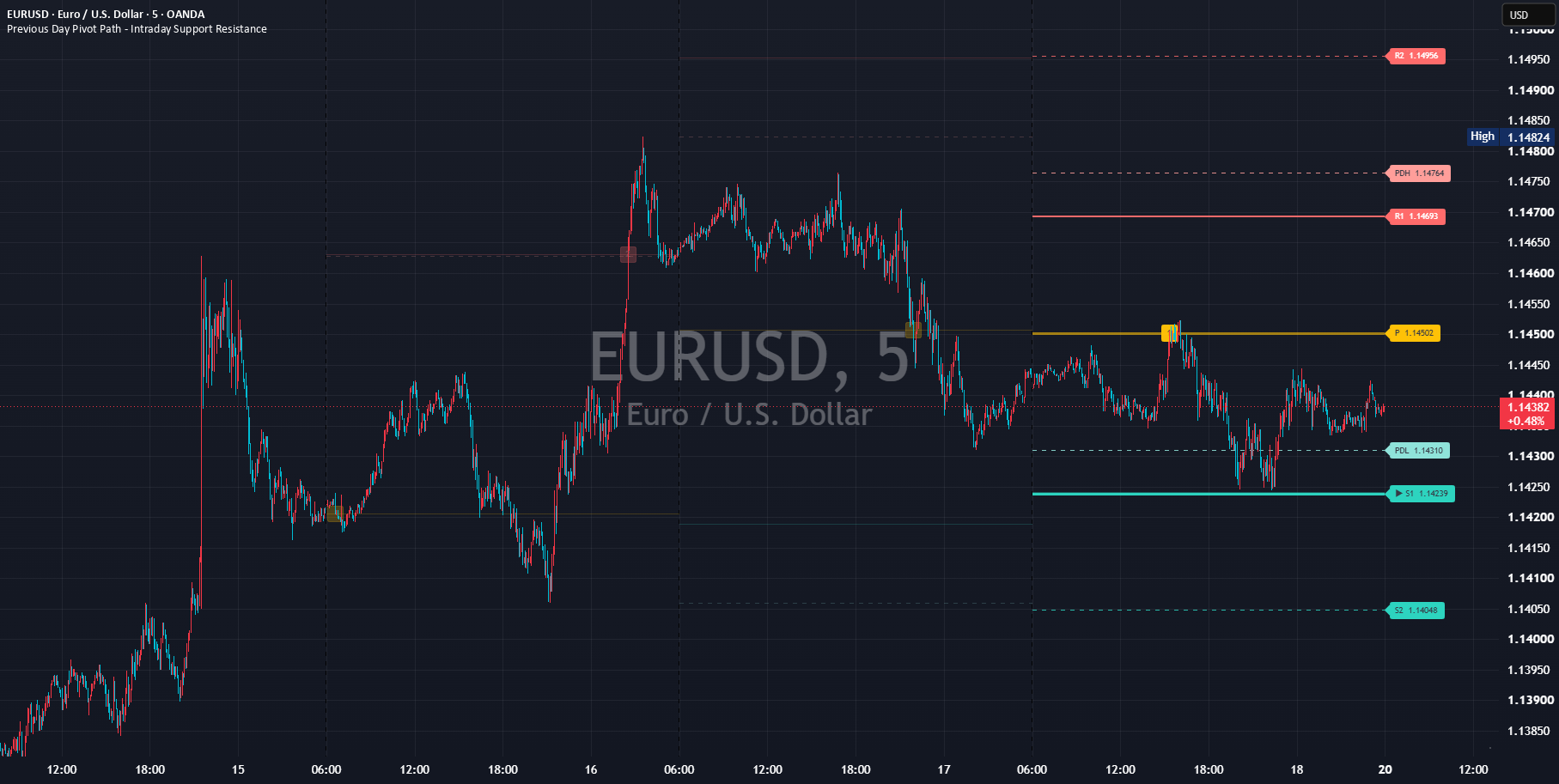
Traditional, Classic, Fibonacci, Camarilla and Custom research formulas generate prior-day pivots. Wick, Body or Close cross defines arrival. The current public inputs, labels and alerts are English-only and there is no Language input.
P, R1-R3, S1-S3, reached-level fading, nearest-unreached focus, first-arrival badges and right-edge labels, with optional CPR, PDH, PDL, PDC, day open, opening bracket and a two-column session brief.
Automatic OHLC source uses chart context on standard candles and the standard symbol on non-standard charts. If a time-aligned standard-source bar is unavailable, the script does not forward-fill stale values; events pause and drawings freeze at the last valid bar.
The selected Pivot method calculates P and R/S. Level rounding aligns prices to tick size, while duplicate rounded levels can be merged.
When one OHLC bar first reaches several levels, they share a rank because their true intrabar order is unknown.
Confirmed bar records after close. Live bar can latch wick arrivals, while Body and Close cross invoke the confirmed safeguard.
Add the public script to a chart and identify every drawing in the default configuration first. Change only one input at a time.
Open the public Previous Day Pivot Path – Intraday Support Resistance page and add it to a TradingView chart. No SG Group account is required.
Overlapping lines, bands, backgrounds or tables can be duplicate drawings of the same kind of information. Never treat visual overlap by itself as stronger evidence or signal agreement. Built-in Pivot Points, CPR, previous-day high/low and daily-open studies can draw P, R/S, CPR, PDH/PDL, PDC and OPEN at the same or nearly the same prices. Remove duplicates before interpreting arrival badges.
Do not turn one value or color into a conclusion. Check the condition, persistence and relationship to price in order.
Use Method and Timing / source in the session brief to establish the formula, price series and confirmation mode.
Check Arrival basis, Touch tolerance and Arrival universe before comparing pending and ranked levels.
Use At P / Above P / Below P, Reached and Next unreached as context, not direction forecasts.
The day open is near / above / below P; not a direction forecast.
Not reached / shared first-arrival rank for the day.
Tracking disabled / every tracked level reached / unavailable.
Live wick retention / forced confirmation for Body or Close cross / confirmed-bar processing.
Waiting for prior-day data / missing source bar / aligning daily data.
Synthetic-chart events paused / partial first day / ready.
The labels below match the published script’s English Inputs panel. Defaults reflect the public source at the time of review and may change in a later TradingView update.
On small screens, each input is reformatted as a readable stacked card.
| Input label | Default / options | What it controls and when to adjust it |
|---|---|---|
OHLC source | Automatic; Automatic / Chart context / Standard symbol | Selects the OHLC price series used for pivot calculations and arrival detection. |
Visible exchange days | 3; 1–15 | Sets how many exchange trading days of lines and historical badges remain visible. |
| Input label | Default / options | What it controls and when to adjust it |
|---|---|---|
Pivot method | Traditional; Traditional / Classic / Fibonacci / Camarilla / Custom research | Selects the formula used to calculate the pivot levels. |
Level depth | Standard; Essential / Standard / Expanded | Selects how many outer pivot levels are included. |
Show P | On | Shows or hides p. |
Show R | On | Shows or hides r. |
Show S | On | Shows or hides s. |
Distance display filter in prior ranges | 0.0; 0–10, step 0.25 | Limits displayed levels by their distance from the anchor, measured in prior-day ranges; zero disables the filter. |
Distance-filter anchor | Day open; Day open / Pivot P / Previous close | Selects the reference price used by the distance display filter. |
Level rounding | Nearest tick; Raw / Nearest tick / Outward tick | Selects whether and how calculated levels are rounded to the symbol's minimum tick. |
Merge duplicate rounded levels | On | Combines logical levels that round to the same price. |
Custom pivot basis | HLC3; HLC3 / HLCC4 / OHLC4 / Midpoint / Previous close | Selects the center price used by the Custom research pivot method. |
Custom range multiplier 1 | 0.382; 0–10, step 0.001 | Sets the custom range multiplier 1 parameter used by 2. Pivot calculation. |
Custom range multiplier 2 | 0.618; 0–10, step 0.001 | Sets the custom range multiplier 2 parameter used by 2. Pivot calculation. |
Custom range multiplier 3 | 1.000; 0–10, step 0.001 | Sets the custom range multiplier 3 parameter used by 2. Pivot calculation. |
| Input label | Default / options | What it controls and when to adjust it |
|---|---|---|
Track first-arrival path | On | Tracks the first time each pivot level is reached during the exchange day. |
Arrival timing | Confirmed bar; Confirmed bar / Live bar | Selects whether arrivals are recorded only after bar confirmation or during the live bar. |
Arrival basis | Wick; Wick / Body / Close cross | Selects whether a wick, candle body, or confirmed close crossing defines an arrival. |
Touch tolerance | Exact; Exact / Ticks / Prior range % | Selects how much distance from a level still counts as a touch. |
Tolerance ticks | 0.0; 0–1000, step 0.25 | Sets the tolerance ticks parameter used by 3. First-arrival path. |
Tolerance as prior-range % | 0.0; 0–25%, step 0.01 | Sets the tolerance as prior-range % parameter used by 3. First-arrival path. |
Count opening gap crossings | Off | Counts an exchange-day opening gap across a level as an arrival when enabled. |
Arrival universe | Displayed levels; Displayed levels / Selected depth / All formula levels | Selects which calculated levels participate in arrival ranking. |
Allow events on synthetic charts | Off | Allows or blocks events on synthetic charts. |
Show first-arrival sequence | On | Shows or hides first-arrival sequence. |
Keep historical arrival badges | On | Keeps or removes historical arrival badges. |
Arrival badge detail | Rank only; Rank only / Level + rank | Selects whether an arrival badge shows only its rank or both the level code and rank. |
Arrival badge size | Small; Tiny / Small / Normal | Selects the arrival badge size setting used by 3. First-arrival path. |
Arrival badge transparency | 2; 0–75 | Sets the transparency of arrival badge. |
Line focus | Nearest unreached; Nearest unreached / Nearest level / Off | Selects which nearby level receives visual emphasis. |
Fallback to nearest after all reached | On | Focuses the nearest level after every tracked level has been reached. |
Reached-level extra fade | 38; 0–90 | Sets the reached-level extra fade parameter used by 3. First-arrival path. |
| Input label | Default / options | What it controls and when to adjust it |
|---|---|---|
Show central pivot range | Off | Shows or hides central pivot range. |
Show previous high and low | On | Shows or hides previous high and low. |
Show previous close | Off | Shows or hides previous close. |
Show current exchange-day open | Off | Shows or hides current exchange-day open. |
Show context labels | On | Shows or hides context labels. |
Show opening bracket | Off | Shows or hides opening bracket. |
Show opening bracket label | On | Shows or hides opening bracket label. |
| Input label | Default / options | What it controls and when to adjust it |
|---|---|---|
Pivot color | #FFC107 | Sets the color used for pivot. |
Resistance color | #FF6B6B | Sets the color used for resistance. |
Support color | #2DD4BF | Sets the color used for support. |
CPR color | #64B5F6 | Sets the color used for cpr. |
Previous high color | #FF9E9A | Sets the color used for previous high. |
Previous low color | #8FE3DA | Sets the color used for previous low. |
Previous close color | #CFD8DC | Sets the color used for previous close. |
Day open color | #C471ED | Sets the color used for day open. |
Label text contrast | Auto contrast; Auto contrast / Manual | Selects automatic or manually assigned label text contrast. |
Manual P text color | black | Sets the color used for manual p text. |
Manual R/S text color | white | Sets the color used for manual r/s text. |
Manual context text color | black | Sets the color used for manual context text. |
Current-line transparency | 2; 0–90 | Sets the transparency of current-line. |
Outer-level extra fade | 14; 0–70 | Sets the outer-level extra fade parameter used by 5. Visual design. |
P line width | 3; 1–4 | Sets the line width used for p. |
R1/S1 line width | 2; 1–4 | Sets the line width used for r1/s1. |
Outer R/S line width | 1; 1–4 | Sets the line width used for outer r/s. |
P line style | Solid; Solid / Dashed / Dotted | Selects the line style used for p. |
R1/S1 line style | Solid; Solid / Dashed / Dotted | Selects the line style used for r1/s1. |
R2/S2 line style | Dashed; Solid / Dashed / Dotted | Selects the line style used for r2/s2. |
R3/S3 line style | Dotted; Solid / Dashed / Dotted | Selects the line style used for r3/s3. |
Show focus halo | On | Shows or hides focus halo. |
Focus halo transparency | 64; 35–95 | Sets the transparency of focus halo. |
Right label detail | Level + price; Level / Level + price / Research detail / Off | Selects the amount of information shown in right-edge level labels. |
Right label offset bars | 4; 1–50 | Sets the bar count used for right label offset bars. |
Auto-stagger close labels | On | Sets the auto-stagger close labels parameter used by 5. Visual design. |
Label collision threshold as prior-range % | 1.25; 0–25%, step 0.05 | Sets the label collision threshold as prior-range % parameter used by 5. Visual design. |
Label lane spacing bars | 5; 1–20 | Sets the bar count used for label lane spacing bars. |
Context label extra offset | 8; 0–50 | Sets the offset used for context label extra offset. |
Right label size | Small; Tiny / Small / Normal / Large | Sets the displayed size of right text. |
Label background transparency | 0; 0–75 | Sets the transparency of label background. |
Historical transparency | 80; 50–98 | Sets the transparency of historical. |
Historical arrival badge transparency | 76; 40–95 | Sets the transparency of historical arrival badge. |
CPR fill transparency | 89; 75–100 | Sets the transparency of cpr fill. |
Opening bracket transparency | 92; 80–100 | Sets the transparency of opening bracket. |
| Input label | Default / options | What it controls and when to adjust it |
|---|---|---|
Show session brief | Off | Shows or hides the compact session summary table. |
Session brief position | Bottom right; Top left / Top right / Bottom left / Bottom right | Selects where session brief is placed. |
Session brief text size | Small; Tiny / Small / Normal | Sets the displayed size of session brief text. |
Session brief background transparency | 16; 0–90 | Sets the transparency of session brief background. |
Show safety notices | On | Shows or hides safety notices. |
| Input label | Default / options | What it controls and when to adjust it |
|---|---|---|
Enable arrival alert conditions | On | Enables or disables arrival alert conditions. |
Enable dynamic alert() messages | Off | Enables dynamic alert messages containing the reached level, shared rank, symbol, timeframe, and method. |
Enable confirmed P-cross alerts | On | Enables or disables confirmed p-cross alerts. |
Alerts are state, touch or transition events defined in the public source. They are not trade instructions.
This tool is for analysis and visualization. It is not investment advice, a trade recommendation, a forecast, or a promise of profit or accuracy. Results depend on inputs, symbol, timeframe, and data feed. You remain responsible for every trading decision.
Tick charts and daily-or-higher charts are explicitly rejected. If loaded partway through the first day, earlier arrivals cannot be reconstructed.
OHLC data cannot establish the true sequence when one bar spans several levels. A shared rank is intentional.
A live wick latch cannot recreate identical tick history after reload. Results also depend on exchange sessions, feed revisions and non-standard-chart handling.
P, R/S, CPR, PDH/PDL and arrival ranks derive from the same prior-day structure. Do not count overlapping outputs as independent evidence. An arrival does not forecast reversal, continuation or breakout.
Clarify the calculation source, first-arrival rank, same-bar ties and current English-only interface.
Yes. It is a free, open-source indicator published by SG Group on TradingView. Review TradingView’s terms and the conditions attached to the public script before reuse or redistribution.
Start with the published defaults and observe the drawings and state changes first. Then change one input at a time for the symbol, timeframe and data feed so you can identify what caused each visual change.
Yes, but similar lines, bands, backgrounds and tables can overlap and obscure their source. Isolate each indicator first and hide duplicate components. Visual overlap alone is not stronger evidence or signal agreement.
No. It is analysis and visualization context consistent with the public description. It does not provide entries, exits, targets, stops, price forecasts, or promises of profit, win rate or accuracy.
OHLC data cannot reveal the true intrabar sequence. If both are first arrivals for the day, they intentionally receive the same rank.
This guide is grounded in SG Group’s live catalogue, the script’s published TradingView description, and the user-facing inputs in its open source. Labels and defaults can change after a script update.