

Stochastic Intrabar Evidence | TradingView Free Indicator
FreeOpen sourcePine Script v6
TradingView Free Indicator
Closing lines cannot tell the whole intrabar story. Keep K/D visible while distinguishing opposite-side visits required by OHLC, unresolved visits, and excluded visits. This is neither tick-path reconstruction nor a trading forecast.
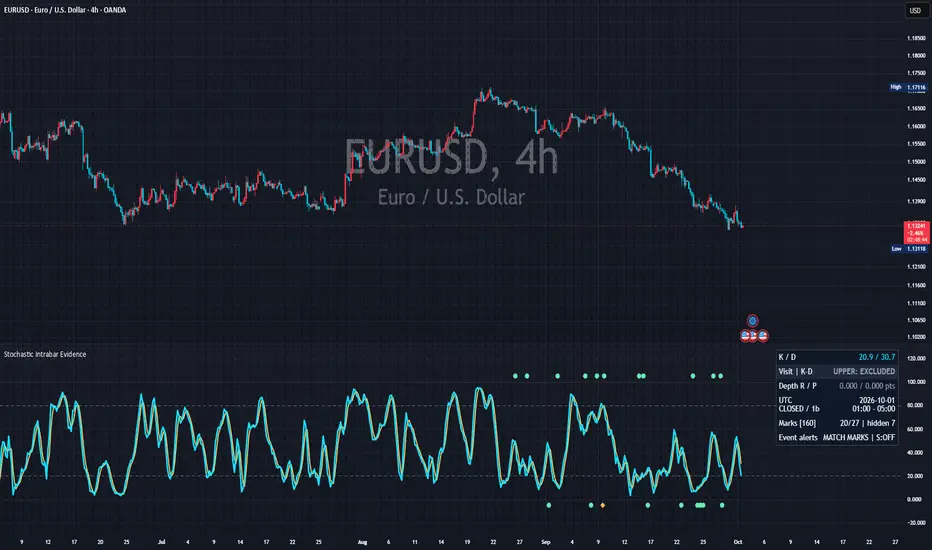
Matching endpoint sides need not imply the same intrabar behavior
A completed-candle diagnostic combining stochastic K/D with tight OHLC-compatible extrema bounds. It requests no lower-timeframe history and assumes no observed tick order. Its purpose is to keep possible excursions distinct from excursions established under the stated model.
What it visualizes
Cyan is K and gold is D. Mint circles mark required opposite-side visits; amber diamonds mark unresolved visits. An upper lane means an upper-side visit with both endpoints below; a lower lane means a lower-side visit with both endpoints above. These directions are not buy/sell instructions.
How it works
Retain the preceding N−1-bar range and consider how the current Open and running extrema can expand it. A candidate observation replaces the current sample, not an additional bar, and updates K and D together. Opening K is not the preceding candle’s closing K.
Same strict-side endpoints
The default subject is K−D. Values above +0.05 or below −0.05 oscillator points are strict sides; the interval between is a margin. The main verdict tests an opposite-side margin-exceeding visit when both endpoints share a side. This margin is neither percent nor a price tick. Fixed upper/lower K references are alternatives.
Required, unresolved and excluded
REQUIRED means every compatible observation sequence visits the opposite side. UNRESOLVED means both visit and no-visit sequences fit the OHLC. EXCLUDED means no compatible sequence makes the specified margin-exceeding visit. It does not exclude smaller movements inside the margin or imply future continuation.
No assumed price order
A compatible sequence begins at Open, ends at Close, remains inside final Low/High and reaches both extremes. Repeated visits and jumps between observations are allowed. Neither high-first nor low-first is assumed to be the observed order, and paths receive no probabilities.
Four raw extrema bounds
Define F(p,h,l)=100(p−l)/(h−l). Let [Lo,Ho] be retained range expanded by Open, and [L,H] retained range expanded by final candle extremes. RawOpen=F(Open,Ho,Lo), RawClose=F(Close,H,L). Minimum floor=F(Low,H,L); minimum ceiling=min(RawOpen,RawClose,F(Low,Ho,L)). Maximum floor=max(RawOpen,RawClose,F(High,H,Lo)); maximum ceiling=F(High,H,L). Each bound is separately attainable; together they do not identify an actual path.
Fixed smoothing history
Candidate K=final K+wK(candidate Raw−final Raw). Candidate D=final D+wD(candidate K−final K). Therefore candidate K−D=final K−D+(1−wD)(candidate K−final K). SMA/RMA use 1/n; EMA uses 2/(n+1) after a full SMA seed. Undefined inputs restart warm-up. D length 1 makes K=D, with no strict K-versus-D side.
Penetration beyond the margin
Depth R / P gives required/possible maximum penetration. With direction +1 upper or −1 lower, depth=max(0,direction×signed extreme−margin). Unresolved required depth is zero. Extreme R / P uses signed extrema: a possible lower-side minimum can be more negative than the required value. Classification uses unrounded numbers.
A span is not an observed path
Optional blue shading is the necessary extrema span; amber edges express uncertainty in extrema. Allowed jumps mean not every intermediate value was necessarily observed. Between-bar connections are visual interpolation. Zero uncertainty for a candle inside the retained range still leaves order, duration and crossing count unknown.
Add it to TradingView
Start with standard candles, range 14, K smoothing 3, D smoothing 3 and SMA. Check the inspector’s evidence-bar time and K-versus-D verdict first. The main question is an opposite-side visit inside a candle whose endpoints share one strict side.
Stochastic Intrabar Evidence
Open the public Stochastic Intrabar Evidence page and add it to TradingView. No SG Group registration is required.
- Open the “Use on TradingView” link below.
- Select “Use on chart” on TradingView to add the script to your chart.
- Open the gear icon, then Settings → Inputs, and observe the default configuration first.
- Change one input at a time for the symbol and timeframe you are studying.
Prevent misreads when indicators overlap
Overlapping lines, bands, backgrounds or tables can be duplicate drawings of the same kind of information. Never treat visual overlap by itself as stronger evidence or signal agreement. K/D, extrema shading, marks and alerts derive from the same OHLC. They are not independent confirmations. Keep required evidence distinct from unresolved possibilities.
- Start in a separate pane; match lengths, smoothing and initialization when comparing another stochastic.
- Outside-0–100 marks are layout lanes, not K/D values, price targets or trade direction.
- Enable extrema shading only when needed; uncertainty edges are not confidence bands.
- Separate inspector tables and avoid creating duplicate dynamic and alternative alerts.
A practical reading order
Read evidence time, verdict, depth, then event selection. Do not interpret marker counts as delivered alert counts.
Distinguish circles and diamonds
Circles mean required and diamonds unresolved. Default Side lanes places them above 100 or below 0, separate from K/D. Their coordinates are layout positions, not oscillator readings. Evidence bounds anchors circles to required extrema and diamonds to outer possible extrema, not measured tick extrema.
Boundary and missing context
BOUNDARY denotes a bound within the separate 0.0000001-point numerical guard of a threshold. NO SAME-SIDE PAIR means opposite endpoint sides or an endpoint near the reference; it is not EXCLUDED. UNAVAILABLE concerns data, retained range or warm-up.
Deeper visits need not create new events
Default repetition selects class or direction changes. A repeated class/direction can grow deeper without a new event; a nonqualifying candle resets comparison. Choose Every qualifying bar to retain repetition, or All evidence (audit) to bypass both repetition and spacing for marks.
Read the same-window counts
The default 160-bar window counts selected/all eligible and hidden events. A forming candle takes a slot without an event. Older marks are display-clipped, not erased from calculations. Pine cannot detect individual plots hidden in Style, so that action does not change coded counts.
Inspector means latest completed candle
Quick read has six rows covering K/D, verdict, depth, times, counts and notification scope. While a candle forms, the table refers to the previous candle; a one-bar distance is not elapsed wall-clock time. It does not follow the crosshair. Use the Data Window for historical evidence.
Times are candle boundaries
UTC is the default; the chart’s display zone cannot be read automatically. Set Evidence time zone explicitly. Quick read compresses redundant fields while retaining necessary sub-minute precision; detailed pages, tooltips and messages retain full timestamps. None identifies excursion time.
Sixteen supporting Data Window series
Beyond K/D: opening K, four K-extrema bounds, uncertainty width, above/below classes, same-side visit class, direction, two signed extrema, two depths, selected-mark flag before clipping, and notification eligibility. Codes 0/1/2/3 mean excluded/unresolved/required/boundary. Secondary FORCED/POSSIBLE above/below states can be implied by endpoints alone and are not the main event diagnostic.
Status and display terms
Every compatible sequence requires the opposite visit, not a certain trade.
Visit and no-visit sequences both fit; actual occurrence is unknown.
Specified margin-exceeding visit is excluded, not smaller within-margin movement.
Too close to a classification threshold under the numerical guard.
No same strict-side endpoints / insufficient data, range or warm-up; neither equals excluded.
Required/possible maximum penetration, in nonnegative oscillator points.
Signed required/possible extrema: minima for lower visits, maxima for upper visits.
Upper/lower visit; question marks mean unresolved, not a trade direction.
Secondary side classifications that endpoints alone may imply; distinct from the main visit verdict.
Settings reference
The labels below match the published script’s English Inputs panel. Defaults reflect the public source at the time of review and may change in a later TradingView update.
On small screens, each input is reformatted as a readable stacked card.
01 – Stochastic reference
6 inputs| Input label | Default / options | What it controls and when to adjust it |
|---|---|---|
Range length | 14 / min 2, max 500 | Stochastic window N, initially 14 chart bars. The retained range uses the preceding N−1 bars. |
K smoothing | 3 / min 1, max 100 | Length for smoothing raw stochastic into K; 1 removes this smoothing. |
D smoothing | 3 / min 1, max 100 | Length for smoothing K into D. At 1, K equals D and no strict K-versus-D side exists. |
Smoothing method | SMA / options: SMA, EMA, RMA | SMA, EMA or RMA. EMA/RMA require complete SMA seeds; undefined inputs restart contiguous warm-up. |
Upper K reference | 80 / min 51, max 99 | Upper fixed K reference, initially 80; used by K versus upper. |
Lower K reference | 20 / min 1, max 49 | Lower fixed K reference, initially 20; used by K versus lower. |
02 – Intrabar evidence
3 inputs| Input label | Default / options | What it controls and when to adjust it |
|---|---|---|
Evidence subject | K versus D / options: K versus D, K versus upper, K versus lower | Choose K against D, the upper level or the lower level. Candidate D updates with candidate K in K-versus-D mode. |
Strict-side margin in oscillator points | 0.05 / min 0, max 5 | Strict-side margin in oscillator points, not percent or price ticks. A separate 0.0000001-point numerical guard applies. |
Minimum usable retained range in ticks | 0 / min 0, max 1000 | Minimum usable retained width in price ticks. A positive usable preceding range is required even at zero; K/D may exist while evidence is unavailable. |
03 – Display and event stream
13 inputs| Input label | Default / options | What it controls and when to adjust it |
|---|---|---|
Show intrabar extrema bounds | Off | Show extrema bounds: blue necessary span and amber uncertainty edges, not an observed path or forecast band. |
Show directional event marks | On | Show directional circles/diamonds. Turning this off also suppresses matching event notifications under the default scope. |
Marker placement | Side lanes / options: Side lanes, Evidence bounds | Place marks in side lanes outside 0–100 or at evidence bounds. Circles anchor required extrema, diamonds outer possible extrema; selection is unchanged. |
Show UP/DN text on marks | Off | Optional UP/DN labels; unresolved marks add a question mark. Off by default to reduce overlap. |
Lane gap outside 0-100 | 5 / min 2, max 12 | Side-lane layout gap, initially 5 axis units; does not change evidence or alerts. |
Event repetition | Class or direction changes / options: Class or direction changes, Every qualifying bar | Reduce repeated class/direction or keep every qualifying bar. Depth changes alone do not create default events; a nonqualifying bar resets comparison. |
Marker mode | Event stream / options: Event stream, All evidence (audit), Spaced event stream | Select the event stream, all eligible evidence without repetition/spacing filters, or a spaced event stream. |
Visible marker window in chart bars | 160 / min 20, max 2000 | Visible marker window, initially 160 bars. A forming bar occupies a slot without a mark; clipping older marks does not remove historical calculations. |
Spacing for Spaced event stream | 3 / min 1, max 50 | Minimum marker spacing for Spaced event stream only. |
Preview live K/D only | Off | Preview forming K/D lines only. Evidence, marks, inspector and alerts remain completed-bar. |
K line width | 3 / min 1, max 5 | K line width, initially 3. |
D line width | 2 / min 1, max 5 | D line width, initially 2. |
Uncertainty-edge transparency | 83 / min 55, max 98 | Uncertainty-edge transparency; higher values are fainter. |
04 – Inspector
6 inputs| Input label | Default / options | What it controls and when to adjust it |
|---|---|---|
Show inspector | On | Show the inspector for the latest completed candle, not the candle under the cursor. |
Inspector page | Quick read / options: Quick read, Decision, Extrema and endpoints, Event audit, Reading guide | Choose the six-row Quick read, Decision, Extrema and endpoints, Event audit or Reading guide page. |
Inspector position | Top right / options: Top right, Top left, Bottom right, Bottom left | Inspector corner; choose one away from other tables. |
Inspector text size | Normal / options: Small, Normal, Large | Small, Normal or Large. Use Small or hide the table on narrow panes; the indicator cannot automatically adapt to viewport width. |
Evidence time zone | UTC / options: UTC, Exchange, Asia/Tokyo, America/New_York, Europe/London | Evidence time zone, independently set from the chart display zone. Exchange uses the exchange zone; named IANA zones follow daylight saving where applicable. |
Evidence decimal places | 3 / min 2, max 6 | Displayed decimal places only; classification uses unrounded values. A rounded zero need not be exactly zero. |
05 – Alerts
3 inputs| Input label | Default / options | What it controls and when to adjust it |
|---|---|---|
Event notification scope | Match marker selection / options: Match marker selection, All event-stream events | Match marker selection follows the full marker gate. All event-stream events ignores visibility/spacing but still follows repetition; audit-only extras are not automatically included. |
Optional endpoint-state notices | Off / options: Off, Class change only, Every closed bar | Separate endpoint-state channel: off, classification-pair changes, or every closed bar. These notices are not matching excursion marks. |
Enable descriptive alert() messages | On | Enable dynamic messages, then create a TradingView alert using Any alert() function call. Avoid duplicate alternative alerts; recreate alert snapshots after intended setting changes. |
06 – Colors
9 inputs| Input label | Default / options | What it controls and when to adjust it |
|---|---|---|
K | #18DFFF | K line color, initially cyan. |
D | #FFD166 | D line color, initially gold. |
Required visit / circle | #67EDB1 | Required-visit circle color, initially mint. |
Unresolved visit / diamond | #FFB85C | Unresolved-visit diamond color, initially amber. |
Necessary extrema span | #78B7FF | Necessary extrema span color, initially blue; not an observed-path color. |
Excluded / guides | #93A2BB | Excluded classification and guide color. |
Boundary / unavailable | #D0A5FF | Boundary and unavailable color, initially purple. |
Inspector background | #101827 | Inspector background; maintain text contrast. |
Inspector text | #F0F5FF | Inspector text; maintain background contrast. |
Dynamic messages and two alternative alert conditions
Adding the indicator does not start an alert. Enable descriptive alert() messages and create one TradingView alert using Any alert() function call. At bar close, messages identify symbol, timeframe, evidence times, relation, margin, direction, class, extrema and depth. Coincident optional state information is combined into one message.
- Selected required opposite-side visit: the selected required event, as a less detailed alternative to dynamic messages.
- Selected unresolved opposite-side visit: the selected unresolved event, not confirmation that the excursion actually happened.
- Match marker selection: default scope shares the marker gate, including audit/spaced mode and Show directional event marks. Turning marks off suppresses matching event notices.
- All event-stream events: ignores visibility and spacing but still follows repetition. Audit-only extra marks are not automatically notified.
- Optional endpoint-state notices: a separate channel, off by default. Choose classification-pair changes or every closed bar; these are not matching excursion marks.
- Avoid duplicate routes: use dynamic messages or alternative conditions unless duplicates are intended. Existing alerts keep creation-time snapshots; recreate after intended setting changes. Historical eligibility does not prove delivery.
Not a buy/sell signal
This tool is for analysis and visualization. It is not investment advice, a trade recommendation, a forecast, or a promise of profit or accuracy. Results depend on inputs, symbol, timeframe, and data feed. You remain responsible for every trading decision.
Information is limited to OHLC
Standard OHLC and Close only; nonstandard charts are disabled. Actual tick order, crossing count, excursion time, dwell time, execution price and fills are not recovered.
Available K/D need not mean available evidence
A complete valid H/L/C window, valid current Open, initialized smoothing and usable preceding N−1 range are required. A flat retained range can leave evidence unavailable while current K/D exists.
Live lines are not early evidence
Preview live K/D only affects the lines. Evidence, marks, inspector and alerts remain completed-bar. Data corrections, missing bars, starting history and inputs can change recalculated results; this is no unconditional never-repaint promise.
Not crossover or alert replay
ta.crossover and ta.crossunder compare against the previous chart bar, not the previous tick. An intrabar opposite-side visit does not establish that an arbitrary function or alert fired.
Pane width and research limitations
On narrow panes use Small inspector text or hide the inspector; Pine cannot detect viewport width. Frequency and depth are not win rates or trading edge. Orders, cost analysis and out-of-sample strategy performance are not supplied.
These verdicts diagnose completed OHLC under explicit assumptions. Required does not mean a certain trade; unresolved is not a weaker confirmed signal. Any trading application needs separately specified rules, execution assumptions and costs.
Frequently asked questions
Clarify endpoint sides, intrabar evidence, selection and notification scope.
Does a diamond confirm an actual crossing?
No. Visit and no-visit sequences both fit the same OHLC; actual occurrence is unresolved.
Is opening K the prior closing K?
No. It uses the current Open and the opening running range.
Does a circle above 100 mean K exceeded 100?
No. Default side lanes separate marks from the lines; their coordinates are layout positions.
Why can deeper evidence produce no new mark?
Default repetition reacts to class or direction changes, not depth alone. Change repetition or use audit mode to inspect every eligible candle.
Why might no notification arrive?
Create a TradingView alert and check scope, Show marks, repetition and spacing. Recreate existing alert snapshots after intended configuration changes.
Is it free?
The source is open under Mozilla Public License 2.0. Follow the license and applicable publication rules when modifying or reusing it.
Source basis and update policy
This guide is grounded in SG Group’s live catalogue, the script’s published TradingView description, and the user-facing inputs in its open source. Labels and defaults can change after a script update.