Round Number Levels – Response and Control Guide | SG Group
Skip to content
Japanese page

FreeOpen sourcePine Script v6

TradingView Free Indicator

Fix round-number levels before observing reactions. Track whether later closes return to the approach side or pass through, then compare with two shifted grids under matched prior conditions.

Round Numbers / Response and References
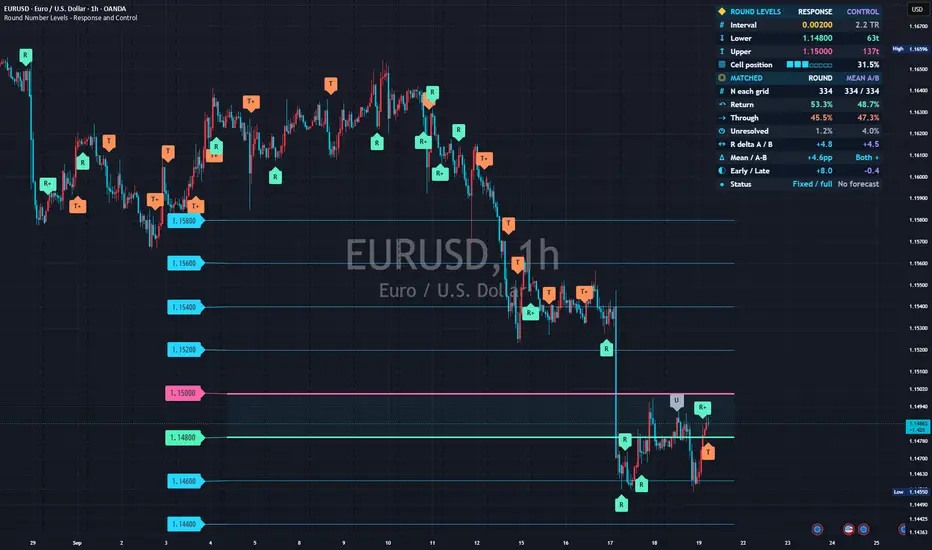
Real chart published on TradingView: Round Number Levels - Response and Control
Real chart image from the published TradingView page. The symbol, timeframe, settings and prices shown are a captured example, not current data or a trading result.
PurposeCompare fixed round-level responses with two equally spaced references
Best forUsers watching round numbers while checking response differences and sample limitations
Primary outputFixed levels, readable price badges, R/T/U markers and matched research panel
Chart placementPrice-chart overlay
01 — Overview

Test the response without assuming round numbers must work

ROUND levels are integer multiples of a zero-origin interval, not selected historical reaction points. References A/B share the spacing and are matched by time, approach side and prior range/trend context. Negative differences, disagreement and insufficient samples are legitimate findings.

What it visualizes

Default colors are cyan for ordinary levels, yellow every fifth interval, mint for the enclosing lower level and pink for the upper. Enclosing roles override major color. Badges retain exact level prices; R/T/U mark known ROUND outcomes. Optional dotted A and dashed B lines can stay hidden while research continues.

How it works

For interval I, levels are 0, I, 2I and so on. Default 200 ticks equals 0.200 with a 0.001 tick or 0.00200 with a 0.00001 tick. A shifts by a tick-rounded 37% of I; B takes the complementary ticks. Automatic preview depends on initial history, so use Manual price to lock its chosen interval.

Admitted contacts

A candle range must intersect a level band while the prior close has adequate clearance on one approach side. Default band half-width is 4% of interval, minimum one tick; clearance defaults to 12%, at least one tick beyond the band.

Shared ambiguous-bar exclusion

If an opening gap crosses an entire band in any grid, or one candle touches multiple level bands in any grid, all three reject new contacts on that candle. Active observations continue. Overlapping configured contact bands also pause comparison.

Frozen response thresholds

Default response distance is 20% of interval, optionally a prior finite mean-range multiple, at least one tick beyond the band. It freezes at contact. Exclude the contact candle: subsequent closes at or beyond the approach-side threshold count toward R, opposite-side closes toward T, with two consecutive closes by default.

Confirmation versus maturity

The first confirmed R or T is fixed; each counter resets on its own failed condition. Last-horizon-bar confirmation precedes U. Even early results wait the full default 12-bar horizon before comparison. Other unresolved contacts do not impose a busy state or outcome-dependent cooldown.

Ordinal matching without outcomes

Epoch-anchored clock blocks default to 128 chart periods. Within each block, side and context stratum, match first ROUND/A/B contacts, then second contacts, up to eight each by default. Reject triplets exceeding half-block time spread without rematching to preferred partners.

Prior context only

Prior finite mean true range divided by interval is low below 0.25, middle from 0.25 to below 0.75, high at or above 0.75. Prior close minus the close ten bars earlier defines trend with an inclusive ±0.5 prior-range neutral band. Defaults give two sides × three range × three trend strata.

A common mature window

Use complete blocks whose contacts have all received the full horizon, default latest 24 mature blocks. Exclude blocks cut by history or study dates. Start is inclusive, end exclusive; admitted contacts still mature after the end date. Complete empty blocks do not become fabricated trades.

02 — Install and start

Add it to TradingView

Use a standard time-based chart and check the Interval price value first. The default is 200 minimum ticks, not 200 pips. Start with Compact and specify interval, dates and observation rules before interpreting differences.

Round Number Levels – Response and Control

Open the public Round Number Levels – Response and Control page and add it to TradingView. No SG Group account is required.

  1. Open the “Use on TradingView” link below.
  2. Select “Use on chart” on TradingView to add the script to your chart.
  3. Open the gear icon, then Settings → Inputs, and observe the default configuration first.
  4. Change one input at a time for the symbol and timeframe you are studying.
Observe the defaults firstChange one input at a timeVerify symbol, timeframe and feed

Prevent misreads when indicators overlap

Overlapping lines, bands, backgrounds or tables can be duplicate drawings of the same kind of information. Never treat visual overlap by itself as stronger evidence or signal agreement. Base levels, major emphasis, enclosing roles, half guides and A/B references serve different functions. Other horizontal tools can obscure prices or make related drawings look like independent evidence.

  • Hide other horizontal tools first and compare line prices with badge digits, not displaced box positions.
  • Half guides and major emphasis do not create extra research cohorts. Hidden A/B lines still participate in research.
  • R/T/U timestamps identify outcome bars, not early contact signals. Use + and tooltip counts for simultaneous results.
  • Start with left badges and separate the panel using location, clearance and size controls. Drawing thinning is not statistical exclusion.
03 — How to read it

A practical reading order

Compact has 14 rows, Standard 22 and Research 32. Read interval and denominator before rates, reference differences, disagreement and window coverage.

Check prices and units

Interval is spacing in price units. Lower/Upper are exact enclosing levels; distances use ticks and Cell position locates price within the interval. Displacing badge boxes does not move their printed value or level line. Digits-only badges retain roles through colors and tooltips.

Check equal denominators

N each grid shows equal matched counts for ROUND, A and B, not storage limits or visible markers. Return/Through/Unresolved compare ROUND with the arithmetic mean of A/B shares. U remains in the denominator; tooltips show individual reference counts and shares.

Read percentage-point differences

R delta A / B subtracts each reference return share from ROUND. A 40% versus 35% share gives +5 percentage points, not a 5% relative gain or future probability. Mean averages the two differences; SPLIT exposes opposite signs even when the mean is positive.

Respect small-sample guards

Default main deltas require 30 triplets, five per side and three contributing blocks. Counts and outcome shares can remain visible when deltas are withheld. Early/Late uses contiguous halves of the retained window with smaller denominators and separate guards, not a held-out test.

Inspect coverage in fuller panels

Standard adds all mature contacts, matched coverage, over-cap counts, contributing blocks, spread and window coverage. Research adds exact enclosing-level matched history, side counts, separate A/B outcomes, shared exclusions and reproduction details. Matching can retain only part of the contact population.

Do not count markers as sample N

Markers show eligible ROUND outcomes before matching, while the panel uses matched fully mature triplets. When several resolve on one candle, the oldest contact represents that candle and + indicates more. Inspect the R/T/U counts in its tooltip. Visible-marker counts cannot reconstruct the denominator.

Separate live context from research

Live enclosing levels and shading may change intrabar; observations and results use confirmed bars. The matched panel waits for closed mature blocks and need not change every candle. Showing only the latest unresolved thresholds does not stop other observations.

Preserve reproducible records

RN6_ outputs retain protocol 6001, settings, clock window, actual N, differences, mean, sign status and a non-cryptographic OHLC checksum. Each grid exports contact time, tick level, side, fixed threshold, result, first-confirmation age, stratum and ordinal at contact plus effective H. Unmatched/over-cap records remain; negative ordinal identifies a partial/date-cut block exclusion.

Status and display terms

ROUND / A / B

Base round grid / shifted A / complementary B, equally spaced but distinct levels.

R / T / U

Return to approach side / through to opposite side / unresolved at horizon. R/T require consecutive closes.

R+ / T+ / U+

Additional outcomes share the bar; the oldest contact is representative. Tooltip provides counts.

N each grid

Equal matched count per grid, not visible-marker count or capacity.

R delta A / B; Mean

ROUND-minus-A/B return-share differences and their mean, in percentage points.

Both + / Both – / SPLIT / Has zero

Both differences positive / both negative / opposite signs / one or both exactly zero; not significance labels.

Early / Late

Contiguous early/late halves with their own smaller denominators and guards.

PREVIEW

Automatically previewed spacing, history-sensitive until manually locked.

Low N / Partial / Fixed / full

Low sample / partial coverage / fixed spacing and displayed-window coverage; not an optimization instruction or performance certificate.

RN6_ / 6001

Numeric export prefix / research protocol identifier.

04 — Settings reference

Settings reference

The labels below match the published script’s English Inputs panel. Defaults reflect the public source at the time of review and may change in a later TradingView update.

On small screens, each input is reformatted as a readable stacked card.

01 | Fixed grid and reproducibility

10 inputs
Input labelDefault / optionsWhat it controls and when to adjust it
Spacing modeManual ticks / options: Manual ticks, Manual price, Auto preview (prior range), Auto preview (price %)Manual ticks fixes a tick interval; Manual price fixes a price interval. Automatic previews choose a 1–2–5 spacing once from initial usable prior range/price context, so lock the displayed value manually for repeatability.
Fixed interval (minimum ticks)200 / min 1, max 1000000000Fixed spacing in minimum ticks, default 200, not 200 pips. A 0.001 tick yields 0.200; a 0.00001 tick yields 0.00200.
Fixed interval (price units)0.2 / min 1e-9, max 1000000000000Fixed price-unit interval, default 0.2, rounded to whole minimum ticks. The zero-origin grid is not fitted to earlier reactions.
Prior mean true-range length50 / min 2, max 500Finite simple mean true-range length, default 50, not recursively seeded Wilder ATR. Research uses the previous bar’s value.
Preview interval / prior mean range3 / min 0.25, max 30Prior mean-range multiple for automatic spacing preview, default three; unused in manual modes.
Preview interval / prior price (%)0.25 / min 0.001, max 20Prior-price percentage used by price-based spacing preview, default 0.25%.
Major level every N intervals5 / min 2, max 20Major-line emphasis every N intervals, default five. Drawing only, not a cohort-selection rule.
Study start (inclusive)2025-01-01 00:00 UTCInclusive study start, default 2025-01-01 00:00 UTC. Earlier finite-range/trend context is still needed.
Study end (exclusive)2100-01-01 00:00 UTCExclusive end, default 2100-01-01 00:00 UTC. Existing contacts still receive their full horizon; date-cut blocks do not enter the matched sample.
Require full start-date contextOffRequires loaded history across the requested start plus sufficient preceding context. Otherwise research stays off. When disabled, the initial partial block is excluded and coverage is disclosed; grid drawings remain available.

02 | Contact and outcome rules

8 inputs
Input labelDefault / optionsWhat it controls and when to adjust it
Enable three-grid researchOnEnables three-grid research for ROUND and references A/B, independently of the price-grid display.
Contact half-width (% of interval)4 / min 0.1, max 10Contact-band half-width, default 4% of interval with a one-tick minimum. Contact tests intersection with the candle’s high-low range.
Prior-close clearance (% of interval)12 / min 1, max 45Prior-close clearance from the level, default 12% of interval, at least one tick beyond the contact band.
Response distanceInterval fraction / options: Interval fraction, Prior mean rangeResponse-distance basis: interval fraction or prior mean range. The chosen distance is frozen at contact.
Response threshold (% of interval)20 / min 1, max 200Interval-based response distance, default 20%, with a floor at least one tick beyond the contact band.
Response threshold / prior mean range0.6 / min 0.05, max 10Prior mean-range multiple for the response threshold, default 0.6; subsequent volatility does not move it.
Consecutive closes to confirm2 / min 1, max 10Consecutive qualifying closes, default two. Each side’s counter resets whenever its own condition fails.
Full observation horizon (bars)12 / min 1, max 100Full horizon after contact, default 12, at least the confirmation count. Early outcomes wait until full maturity for comparison; concurrent contacts are not blocked.

03 | Outcome-blind matching

13 inputs
Input labelDefault / optionsWhat it controls and when to adjust it
Reference A / interval0.37 / min 0.15, max 0.85A offset as interval fraction, default 0.37 rounded to ticks. B uses the exact tick complement, normally about 0.63. Overlapping contact bands pause comparison.
Clock block (chart periods)128 / min 16, max 2048Epoch-anchored elapsed-time block length, default 128 chart periods; on 5-minute charts this is 640 minutes, not 128 actually traded bars.
Maximum matched time spread (% of block)50 / min 1, max 100Maximum earliest-to-latest contact-time spread in a triplet, default half a block. Failed triplets are not rematched.
Match on prior contextSide + range + trend / options: Side only, Side + range, Side + range + trendMatches on approach side, optionally prior range and trend bins. Within each block/stratum, pair first contacts, then second contacts, and so on, without using outcomes.
Range/interval: low boundary0.25 / min 0.01, max 10Low boundary for prior mean range divided by interval, default 0.25; values below it are low.
Range/interval: high boundary0.75 / min 0.02, max 20High boundary, default 0.75; with defaults, 0.25–<0.75 is middle and ≥0.75 is high.
Prior trend lookback (bars)10 / min 1, max 500Prior trend lookback, default 10: preceding close minus the close ten bars before that.
Prior trend neutral band / mean range0.5 / min 0, max 20Neutral trend band, default ±0.5 prior mean range, including both boundary values.
Retained mature clock blocks24 / min 4, max 64Retained mature clock blocks, default 24, shared by all grids. Partial blocks are excluded; complete empty blocks are allowed without fabricating observations.
First contacts per grid / stratum / block8 / min 1, max 12Outcome-blind first-K matching cap per grid/stratum/block, default eight. Later contacts are still tracked/exported and cap exclusions counted.
Minimum matched triplets for deltas30 / min 3, max 1000Minimum matched triplets for main deltas, default 30. Counts and outcome shares remain visible below the guard.
Minimum triplets per approach side5 / min 1, max 200Minimum triplets per approach side, default five.
Minimum contributing clock blocks3 / min 1, max 64Minimum contributing blocks, default three. A display guard, not evidence of significance or independence.

04 | Chart appearance

34 inputs
Input labelDefault / optionsWhat it controls and when to adjust it
Base levels on each side6 / min 2, max 24Base drawing levels on each side, default six; does not select research observations.
Line length behind current bar260 / min 20, max 4000Line segment length behind the current bar, default 260 bars.
Line end to the right (bars)14 / min 2, max 100Right-side line endpoint, default 14 bars.
Line extensionSegment / options: Segment, Right, BothSegment, right extension or both directions. A visual projection of the fixed grid, not historical signals.
Reduce distant-line clutterOnReduces distant-line clutter.
Drawing radius / current mean range12 / min 2, max 100Drawing radius in current mean ranges, default 12. Enclosing base levels remain and research observations are not removed.
Show level price badgesOnShows level-price badges.
Show half-interval guidesOffOptional half-interval guides, hidden for odd tick intervals to avoid uneven subdivision. Never researched.
Show reference A linesOffShows dotted A lines; research continues when hidden.
Show reference B linesOffShows dashed complementary B lines; visibility does not control research.
Shade the current price cellOnShades the cell enclosing current price.
Follow the live price for visual contextOnAllows enclosing lines, distances and shading to follow live price intrabar. Observations, outcomes and research use confirmed bars.
Show latest unresolved round-contact thresholdsOnShows thresholds for the latest unresolved ROUND contact only. Other contacts continue; these are research thresholds, not stops or targets.
Mark completed round-grid outcomesOnShows R/T/U on the confirmed outcome bar, never backdated to contact.
Maximum outcome markers60 / min 0, max 250Maximum visible outcome markers, default 60; zero hides them without truncating the ledger.
Base line width1 / min 1, max 4Base-line width, default one.
Major line width2 / min 1, max 4Major-line width, default two.
Enclosing line width3 / min 1, max 5Enclosing-line width, default three.
Price badge placementLeft of segment / options: Left of segment, Right of segmentPlaces badges left or right of segments. Default left placement helps avoid the right-hand panel.
Show response-threshold captionsOffShows response-threshold captions; off by default.
Minimum marker gap at the same level12 / min 0, max 100Minimum spacing from the latest drawn marker at the same level, default 12 bars. Drawing-only thinning; concurrent outcomes and full-horizon records remain.
Round-number font size (points)13 / min 10, max 36Base round-number badge font size, default 13 points, independent of panel and outcome markers.
Major / enclosing font size (points)14 / min 10, max 40Major/enclosing font size, default 14 points, at least the base badge size.
Round-number badge appearanceSolid level color / options: Solid level color, Dark badgeSolid level color uses opaque level-colored badges with automatic black/white contrast. Dark badge uses white on navy without recoloring lines or panel.
Price digits only in round badgesOnShows digits only by default; disable to restore L/U and other prefixes. Roles remain in colors, tooltips and panel.
Monospace round-number digitsOnUses monospace round-number digits.
Round-badge horizontal gap (bars)12 / min 0, max 150Horizontal badge gap from the segment endpoint, default 12 bars. Leaders keep the true endpoint; right placement may collide with the panel.
Price badge offset (ticks)2 / min 0, max 100Badge-box vertical displacement, default two ticks. Printed price and line remain exact; enclosing badges move outward.
Alternate badge offset directionOnAlternates displacement for non-enclosing badges. Off uses upward displacement for other levels; enclosing lower/upper badges remain outward.
Outcome marker placementAbove/Below bar / options: Above/Below bar, On levelAbove/Below bar clears the outcome candle and selected preceding bars; On level uses the level. Time stays on the outcome bar and no future bars are used.
Outcome marker offset / mean range0.3 / min 0.05, max 3Additional clearance in mean-range units, default 0.3, fixed at outcome confirmation. It does not alter research thresholds.
Marker clearance lookback (bars)3 / min 1, max 25Clearance lookback includes outcome and preceding bars, default three total. Future candles may later enter that area.
Outcome marker sizeNormal / options: Small, Normal, LargeOutcome-marker size: Small, Normal or Large.
Connect displaced badges to exact levelsOnConnects displaced badges to their exact levels.

05 | Research panel

8 inputs
Input labelDefault / optionsWhat it controls and when to adjust it
Show research panelOnShows the research panel.
Panel detailCompact / options: Compact, Standard, ResearchCompact has 14 rows, Standard 22 and Research 32. Detail exposes coverage and separate references without changing observation or matching.
Panel locationTop right / options: Top right, Middle right, Bottom right, Top left, Bottom leftPanel position: top/middle/bottom right, top left or bottom left.
Panel label size (points)14 / min 10, max 22Panel label size, default 14 points.
Panel value size (points)15 / min 10, max 24Panel value size, default 15 points.
Show panel iconsOnShows supplementary panel icons.
Right-side panel inset (%)2 / min 0, max 15Right-side panel inset, default 2%.
Print reproducibility recipe to Pine LogsOffWrites a reproduction recipe at the last confirmed historical bar in personal editor copies only. Published scripts cannot create Pine Logs; public users can export protocol fields. No upload or network call.

06 | Colors

11 inputs
Input labelDefault / optionsWhat it controls and when to adjust it
Base levelsrgba(35,215,255,1)Base-level color, cyan by default.
Major levelsrgba(255,202,65,1)Major-level color, yellow by default.
Enclosing lower levelrgba(78,245,183,1)Enclosing lower level, mint by default; overrides major-level color.
Enclosing upper levelrgba(255,100,173,1)Enclosing upper level, pink by default; overrides major-level color.
Shifted comparisonrgba(180,139,255,1)Shifted-reference color, purple by default.
Return outcomergba(95,240,196,1)Return-result color, mint by default; not a buy signal.
Through outcomergba(255,146,90,1)Through-result color, orange by default; not a sell signal.
Neutral / unresolvedrgba(163,179,199,1)Neutral/unresolved color, blue-grey by default.
Panel and badge backgroundrgba(15,23,38,1)Panel and badge background color.
Panel textrgba(237,244,255,1)Panel text color.
Cell shade transparency95 / min 85, max 100Cell-shading transparency, default 95; larger values are fainter and 100 is transparent.
05 — Alerts

Four observational alert conditions

Create the required alerts in TradingView. They describe observations, not trade instructions. Recreate existing alerts after changing research settings so they use the intended configuration.

  • Round level: new contact — A new ROUND contact is admitted on a confirmed bar.
  • Round level: return confirmed — One or more return outcomes confirm; full-horizon numeric records arrive separately at maturity.
  • Round level: through confirmed — One or more through outcomes confirm.
  • Round level: horizon unresolved — One or more contacts finish the full horizon without R or T.
06 — Limitations and responsible use

Not a buy/sell signal

This tool is for analysis and visualization. It is not investment advice, a trade recommendation, a forecast, or a promise of profit or accuracy. Results depend on inputs, symbol, timeframe, and data feed. You remain responsible for every trading decision.

Not causal or profitable by definition

Shifted references may themselves be round at finer scales. They are not randomized controls or exact counterfactuals. Broad strata leave different paths and unmeasured conditions; Both + proves neither a causal effect, future reversal nor profitability.

Repeated contacts remain dependent

Horizons can overlap. First-K caps, context boundaries, interval and period affect the studied subset. Changing settings after seeing results creates selection risk; small, negative or inconsistent differences remain valid findings.

Preview and history sensitivity

Automatic interval selection depends on initial usable history. Manual spacing and identical sufficient prior OHLC support finite-context and epoch-block reproducibility, but feed revisions, adjustments, sessions and missing bars can change results.

Window coverage is not all-history certification

Full-start context requires history crossing the start with warm-up. Otherwise the initial partial block is excluded. Fixed / full describes the displayed window, not the completeness of all requested history or statistical validity.

Future overlap cannot be prevented

Default glyph clearance uses the outcome candle plus two previous candles and a mean-range margin. Later candles may enter that area. Font, spacing, retention and radius controls affect presentation, not research thresholds or membership.

Standard time-based charts only for research

Non-standard and tick charts retain the grid without comparison research. Blocks are elapsed time, not sessions or traded-bar counts. Weekly/monthly periods use platform seconds conversion rather than calendar-aligned boundaries.

Exports and logs

Emission at effective H bars after contact allows at most one complete record per grid/bar, even if early outcomes coincide. Preserve source, settings and native OHLC including prior context and subsequent horizon. The checksum is not a cryptographic signature. Pine Logs recipes work only in personal editor copies, not the published script.

Important

This indicator observes fixed-level contacts and confirmed-close responses. It models no entry, stop, target, spread, fee or position size and places no orders. R is not automatically profit and T is not automatically loss.

07 — FAQ

Frequently asked questions

Clarify units, denominators and information timing.

Are 200 ticks the same as 200 pips?

No. Multiply 200 by the symbol minimum tick. With 0.00001 ticks the interval is 0.00200. Check the displayed price value.

Does hiding A/B lines stop comparison?

No. Line visibility is separate from Enable three-grid research.

Does an R marker identify the contact candle?

No. It marks the later bar when consecutive closes confirm return, without backdating to contact.

Why do marker counts differ from panel N?

Markers are thinned pre-matching ROUND outcomes; the panel uses fully mature matched triplets. Scope and timing differ.

Does Both + establish a round-number advantage?

It states that both observed return-share differences are positive, not that they are causal, significant, predictive or profitable.

Is it free?

It is a free open-source TradingView indicator with no external service or data fetch requirement. Research requires standard time-based charts.

Source basis and update policy

This guide is grounded in SG Group’s live catalogue, the script’s published TradingView description, and the user-facing inputs in its open source. Labels and defaults can change after a script update.